September 7, 2026
Designing UX for Slow AI and Reasoning Models
Master UI design for reasoning models. Learn the essential UX patterns for slow LLMs that keep your users engaged during long cognitive processing wait times.
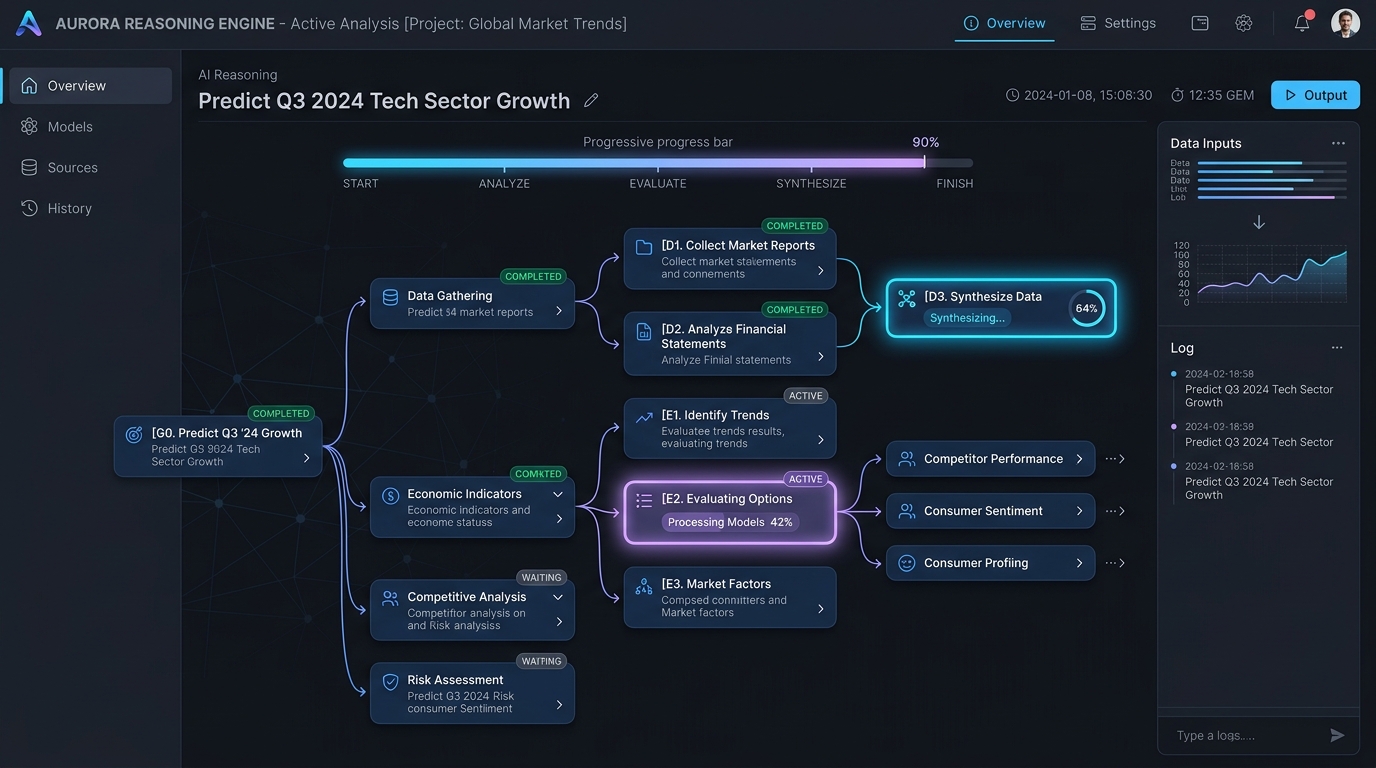
Designing for Deep Thinkers: Essential UX Patterns for High-Latency AI Reasoning Models
For years, the gold standard of generative AI design has been instantaneous gratification. The goal was simple: stream tokens as quickly as possible to simulate a real-time conversation. If the system lagged for more than a second, developers panicked, and users checked their connection speeds.
But a profound paradigm shift is underway. The rise of reasoning models - such as OpenAI's o1 and o3-mini, or DeepSeek-R1 - has changed how we build and interact with AI. These models do not just generate text; they plan, reflect, self-correct, and evaluate alternative hypotheses.
This deep cognitive processing delivers vastly superior results for complex tasks, but it comes at a cost: time. Instead of sub-second streaming, reasoning models can take anywhere from 10 seconds to several minutes to return an answer.
This introduces a massive challenge for product designers and software engineers: How do we design an interface that keeps users engaged, confident, and patient during prolonged periods of high-latency AI execution?
Here is how to master UI design for reasoning models and build software that turns painful waiting periods into a collaborative, intellectually engaging experience.
The New Latency Paradigm: Why Fast Chat Patterns Fail
Traditional LLM interactions rely on low-latency token-by-token streaming. This creates immediate cognitive feedback, assuring the user that the system is active.
When we apply this same pattern to reasoning models, the user experience breaks down. A standard chat input followed by a spinning loading wheel for 45 seconds triggers what UX researchers call "system failure anxiety." Without a continuous feedback loop, users assume the application has frozen, leading them to refresh the page, submit duplicate queries, or abandon the platform entirely.
To design an effective high-latency AI user experience, we must understand that waiting is not inherently bad. It is only painful when it is opaque. Think of a human expert: if you ask a tax attorney a highly complex question, you do not expect them to start talking instantly. You expect them to think, look up references, and organize their thoughts.
The goal of next-generation AI interfaces is to make this "thinking process" visible, structured, and reassuring.
| --- |
The Four Pillars of Cognitive Pacing in AI Design
To successfully manage the cognitive load and waiting times associated with reasoning models, designers must apply four fundamental principles.
1. Radical Transparency
Never hide the thinking process behind a generic loading spinner. If the model is executing five different search queries, testing three Python scripts, and analyzing a massive dataset, the UI should reflect those active states.
2. Micro-Milestones
Break a long waiting period into a sequence of smaller, comprehensible sub-tasks. When users see a succession of completed micro-tasks (e.g., "Refining prompt," "Scanning internal documentation," "Validating code syntax"), their perception of wait time drops dramatically.
3. Progressive Fidelity
As the model works, display skeletal previews of the output. If the AI is generating a comprehensive financial report, render the empty table structures and headings first, filling in the cell data and qualitative summaries as the reasoning process wraps up.
4. Interactive Agency
Give users the ability to pause, redirect, or dig deeper into the thinking process while it is happening. If the user notices the AI taking a wrong turn on step two of a ten-step reasoning chain, they should be able to intervene immediately rather than waiting for the entire, incorrect process to finish.
Practical UX Patterns for Slow LLMs
Designing for high-latency models requires moving beyond the simple chat bubble. Below are the core UI patterns proving most successful in modern enterprise AI applications.
Pattern A: The Collapsible Thought Tree
Rather than hiding the chain-of-thought, expose it as a structured, hierarchical tree. Users can read the reasoning process in real time, or collapse it if they only care about the final output.
▼ Thinking Process (0:14)
  ├── ✔ Interpreted user query: "Calculate Q3 churn rate"
  ├── ✔ Querying PostgreSQL database (Users & Subscriptions)
  ├── ⚙ Analyzing anomaly in August data (Self-correcting...)
  └── ⏳ Generating summary visualization
This pattern satisfies both technical users who want to audit the AI's logic and business users who simply want to know that progress is being made.
Pattern B: The Live Scratchpad
For agentic workflows where the AI is compiling code, running simulations, or conducting research, use a split-screen layout. On the left side, maintain the user-AI conversational thread. On the right, show a live "scratchpad" or "canvas" where the AI drafts its workspace, complete with active logs, terminal outputs, or outline structures.
Key Insight: Visualizing the workspace as a living, breathing document reassures users that the model is actively building their asset, shifting their focus from "How long is this taking?" to "Look at what is being built."
Pattern C: Skeletal Progression & Dynamic Placeholders
Instead of leaving the screen blank or relying on a traditional progress bar, use skeleton screens that morph to reflect the anticipated output structure. If the model determines it will output a three-part comparative analysis, render three blank placeholder cards with subtle pulsing animations.
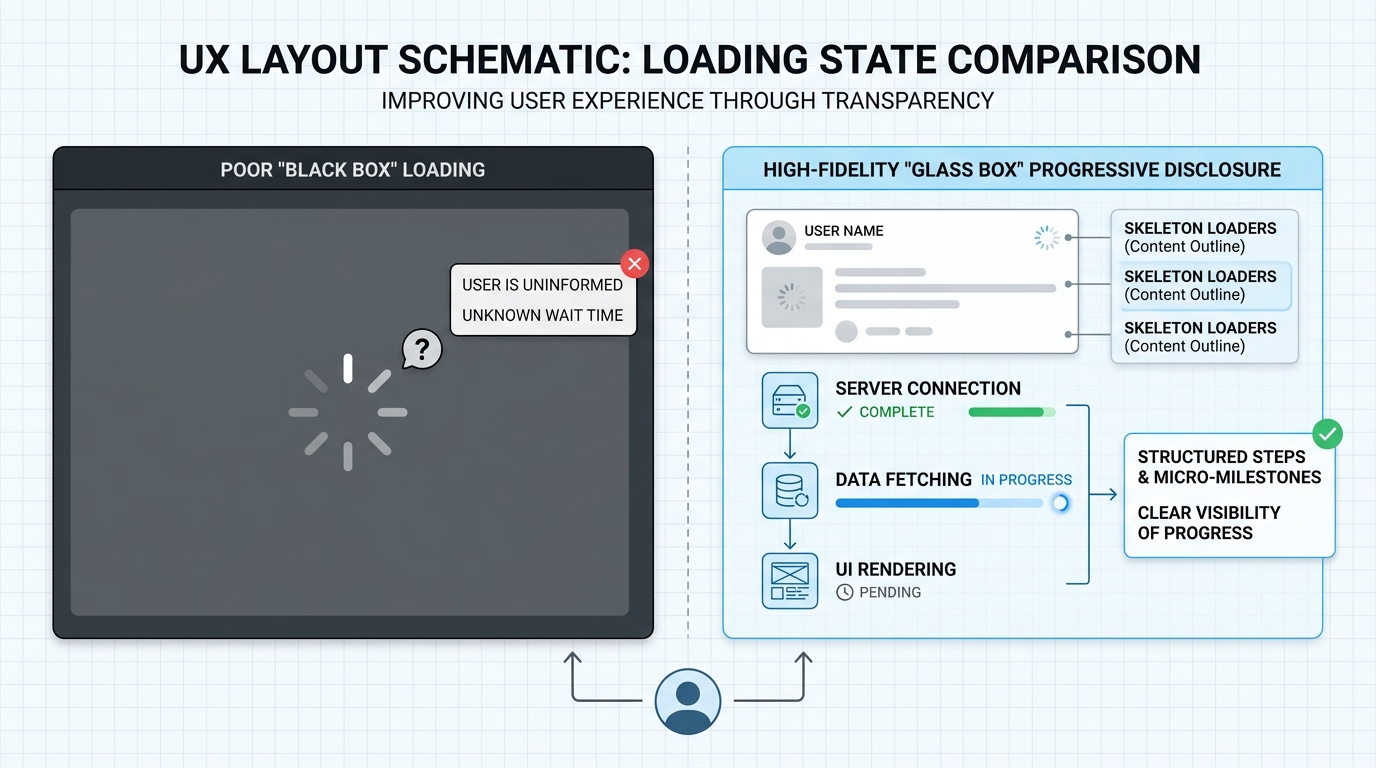
Comparing Chat UI Components for Reasoning Models
When designing interfaces, selecting the right components makes the difference between a high-bounce rate and an engaging, sticky user session. Use this guide to choose the right tools for your UX patterns for slow LLMs.
| Legacy Chat UI Component | Next-Gen Reasoning UI Component | Primary UX Benefit |
|---|---|---|
| Static Loading Spinner | Dynamic Milestone Indicator | Reduces perceived wait times by showing specific, active sub-tasks. |
| Instant Token Streaming | Progressive Markdown Skeleton | Prevents visual jumping of text while providing structural reassurance. |
| Read-Only Output Block | Interactive Thought Nodes | Allows users to expand, audit, or branch off from specific steps in the reasoning chain. |
| Global Cancel Button | Step-Level Intervention Controls | Saves compute costs and user time by allowing adjustments mid-run. |
Implementation Framework: Structuring the Interface
To implement these patterns systematically, teams should adopt a structured design framework that maps the UI states to the model's backend processing stages.
Phase 1: Intake & Intent Structuring
- Backend Activity: The model receives the prompt and decomposes it into a structured plan or directed acyclic graph (DAG).
- UI Representation: Display the formulated plan immediately. Show the user exactly how the AI intends to tackle their complex prompt.
Phase 2: Active Execution & Self-Correction
- Backend Activity: The model executes tools, runs code, reflects on errors, and modifies its path.
- UI Representation: Use live status feeds, step-by-step logs, and micro-animations. If a step fails and the model self-corrects, label it clearly (e.g., "Attempt 1 failed: Syntax Error. Retrying with updated schema..."). This builds tremendous trust.
Phase 3: Assembly & Output Refinement
- Backend Activity: The model synthesizes its findings into a cohesive final output.
- UI Representation: Transition the skeleton placeholders into the final rich-text, code, or data visualizations. Highlight the source references used during the reasoning process.
Lowering Cognitive Load in AI Design
High latency is not a technical failure; it is a feature of deep, algorithmic contemplation. However, managing the cognitive load in AI design means balancing information density.
If you show every single log line and token generation path, you risk overwhelming the average business user. If you hide too much, you create anxiety.
The secret lies in progressive disclosure. Keep the default view clean, elegant, and structured. Use subtle status badges and micro-copy. For power users or technical teams, provide an easily accessible "Developer Logs" or "View Detailed Reasoning" panel.
By designing interfaces that respect the pacing of both human comprehension and deep machine reasoning, we can unlock the true potential of the agentic era.
Related Reading
If you want to dive deeper into optimizing AI systems, managing computational tradeoffs, or automating workflows, check out these guides:
Enjoyed this article? Join the Growency newsletter
Practical AI tips for service businesses, straight to your inbox. No spam, unsubscribe anytime.