August 19, 2026
The Automation Audit: How to Spot and Map Repetitive Work AI Can Handle
The Automation Audit: How to Spot and Map Repetitive Work AI Can Handle
Businesses are bombarded daily with the promise of artificial intelligence. From predictive analytics to generative agents, the landscape is shifting at a breakneck pace. Yet, behind the executive briefings and high-tech demonstrations, operational leaders face a frustratingly practical hurdle:
Where do we actually start?
The mistake most organizations make is attempting to automate complex, highly subjective workflows right out of the gate. They try to rebuild their entire operational engine overnight.
A far more successful, high-ROI approach is to begin with the low-risk, high-frequency processes that quietly drain your team's energy. The secret to unlocking immediate AI operational efficiency lies in identifying and target-mapping your repetitive business tasks.
In this guide, we will break down the structural anatomy of repetitive work, outline seven key indicators of an AI-ready process, and provide you with a practical five-question audit tool to run on your own workflows today.
What Repetitive Work Actually Means (And Why It Matters)
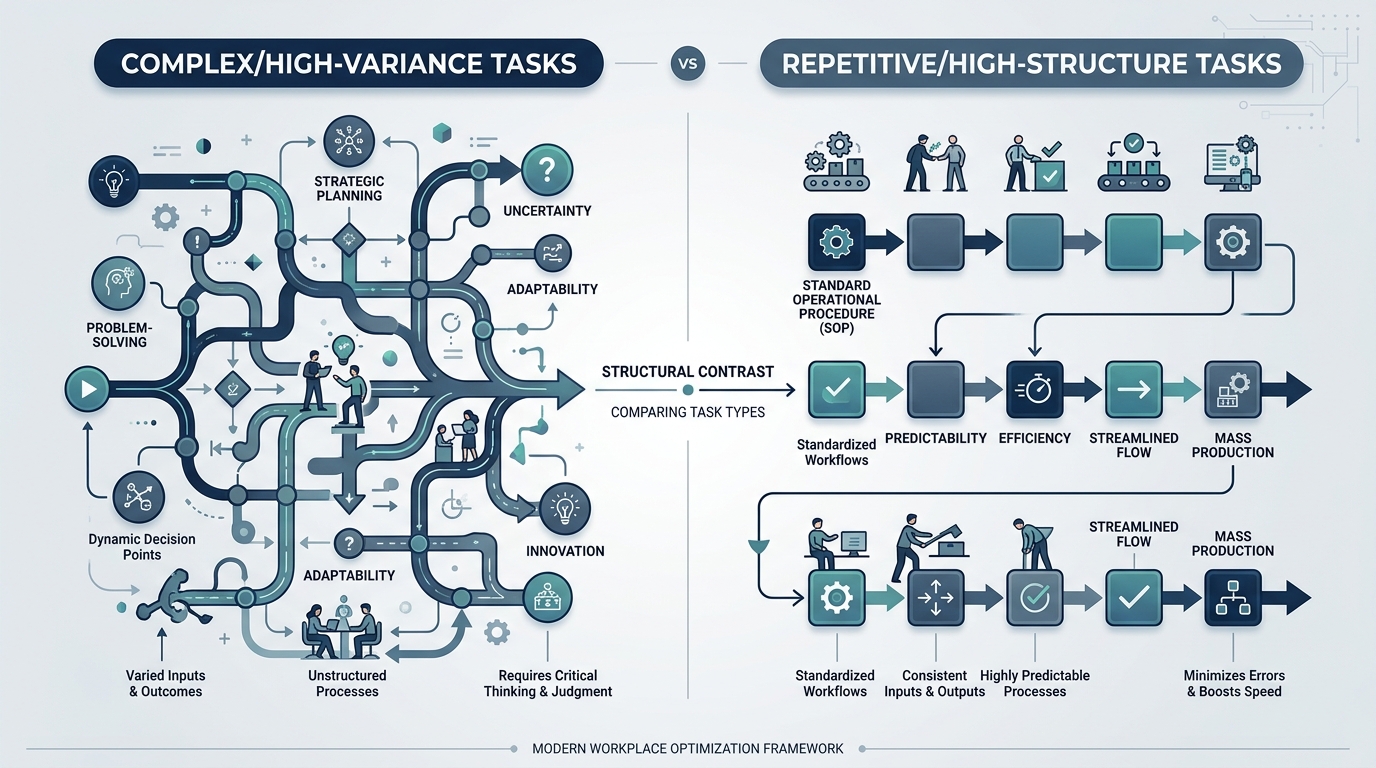
Repetitive work consists of operations that your team performs over and over again with minimal variation. While these tasks are essential to keeping your business running, they rarely require deep strategic thinking, creative problem-solving, or emotional intelligence.
In technical terms, repetitive work can be divided into two main categories:
- Process Execution: Tasks that rely on a strict, logic-based sequence of actions (e.g., moving data from an email form into a database).
- Cognitive Replication: Tasks that require basic pattern recognition or summarization but do not require complex, nuanced decision-making (e.g., categorizing incoming customer support tickets or synthesizing meeting transcripts).
When employees are bogged down by these tasks, your business pays a double tax: first in direct labor costs, and second in the opportunity cost of having your best minds focused on administrative box-checking instead of growth.
Why Repetitive Work is the Ideal AI Entry Point
A major reason AI initiatives fail is that companies start with vague, overly ambitious goals like "improving decision-making." Because these workflows have so many variables, the systems are incredibly difficult to train, test, and trust.
Repetitive workflows, on the other hand, are the perfect sandbox for AI workflow automation for several distinct reasons:
- They have clear boundaries: Because these tasks are structured, it is easy to define what a "successful" outcome looks like.
- They are highly measurable: You can easily calculate the time saved, the reduction in error rates, and the increase in processing speed.
- They are lower risk: Automated sorting, drafting, or data entry can easily run with a "human-in-the-loop" approval step, minimizing the risk of errors reaching your clients.
- They provide rapid validation: Seeing a repetitive process go from hours of manual labor to seconds of automated processing builds organizational trust in technology.
By focusing on these practical wins, you establish a solid foundation of technical capability and cultural trust before tackling larger, more complex transformations.
7 Signs a Task Is a Strong Candidate for AI
To successfully identify tasks for AI, you must look at your daily operations through a structural lens. Look for these seven core indicators within your workflows:
1. High Frequency and Volume
If a task occurs multiple times a day or is executed in large batches weekly, it is a prime candidate. High-frequency tasks create a massive cumulative time drain. Even a minor task that takes only five minutes can become highly expensive when multiplied by dozens of employees and hundreds of occurrences.
- Examples: Sorting inbound customer inquiries, formatting weekly status reports, or clearing standard internal data queues.
2. Predictable, Rule-Based Logic
AI models and classic automation systems thrive when a workflow follows a recognizable, logical pattern. If you can write down the step-by-step rules of a process without constantly using terms like "it depends" or "based on a feeling," the workflow is ready for automation.
- Predictable sequence: Receive structured input -> verify fields -> match against database -> generate standardized response -> update internal CRM.
3. Disproportionate Drain on Highly Skilled Staff
Look at where your most expensive, specialized talent is spending their hours. If senior engineers, account executives, or operations managers are spending 20% of their week on administrative upkeep, your operational design is leaking value.
- The litmus test: If a task does not require their unique training, industry relationships, or strategic intuition, it should be assisted or entirely handled by AI.
4. Human Error Triggers
Human brains are not built for highly repetitive, high-detail tasks over long periods. Fatigue leads to data entry mistakes, forgotten email follow-ups, and inconsistent categorizations. AI, by contrast, operates with identical consistency on its millionth run as it does on its first.
- Signs of fatigue: Miskeyed invoice numbers, missed notification emails, or inconsistent categorization of support tickets.
5. Heavy Information Movement (Data Silos)
A massive amount of modern knowledge work is simply moving data from one application to another. This includes taking information out of an email and putting it into a spreadsheet, or extracting data points from a PDF and uploading them to a software platform.
- How AI solves this: Using Large Language Models (LLMs) with structured JSON outputs, AI can read unstructured text (like emails or documents), pull out the critical details, and push them directly to your other business tools via APIs.
6. Critical Need for Real-Time Speed
If your business experiences bottlenecks where delays directly harm your customer experience or stall your team, those areas need attention. Manual triage is inherently slow because it relies on human availability.
- The speed bottleneck: Leads waiting hours to be qualified, support tickets sitting in queues over the weekend, or internal teams waiting for standard SOP documentation answers.
7. Explicit Employee Frustration
Often, your own team will tell you exactly what needs to be automated. Listen to the complaints. If your employees consistently describe a specific task as tedious, boring, or administrative overhead, it is a prime target. Automating these tasks boosts morale and allows your team to focus on the work they actually enjoy.
Key Insight: The ultimate goal of AI implementation is not the reduction of human headcount. It is the amplification of human capability. By removing low-leverage, administrative friction, you unlock your team's creative and strategic potential.
Strategic Areas Ripe for AI Automation
You do not need to look far to find highly repeatable workflows. In almost every modern digital business, these four areas are filled with low-hanging fruit:
| Business Area | Repetitive Workflow | How AI Handles It |
|---|---|---|
| Customer Support | Ticket classification & routing, common FAQ responses, draft generation. | Semantic routing models categorize incoming tickets and draft highly accurate responses for agent review. |
| Sales & Marketing | Inbound lead qualification, CRM updates, transcription summarization. | Conversational agents qualify leads via chat/email, while summary tools extract key action items from sales calls. |
| Operations & Admin | PDF data extraction, system-to-system data entry, meeting documentation. | Document-processing models extract structured key-value pairs from invoices or contracts, auto-populating databases. |
| Internal Enablement | Searching internal SOPs, retrieving policy files, onboarding navigation. | A retrieval-augmented generation (RAG) assistant acts as a chat interface over your internal company wiki. |
The 5-Question Automation Audit Tool
If you are looking at a specific workflow in your business and trying to decide if it is a good candidate for AI, run it through this quick evaluation tool.
THE 5-QUESTION AUTOMATION AUDIT
- 11. Does this task occur daily or weekly at high volume?
- 22. Does it follow a clear, predictable set of steps?
- 33. Does it pull skilled staff away from high-value work?
- 44. Would faster response times or fewer errors help?
- 55. Can a human review the output before it is finalized?
If you answered yes to three or more of these questions, you have found an excellent opportunity for AI automation.
What You Should NOT Automate First
As you search for opportunities, it is equally important to know what to avoid. Do not start your AI journey with workflows that:
- Require high emotional nuance: Delivering sensitive news, resolving high-stakes client conflicts, or handling highly delicate personal situations.
- Are completely unstructured: If your team does not agree on how a task should be done, you cannot expect an AI to figure it out. First build the process, then automate it.
- Carry high legal or safety compliance risks: Processes where a single hallucination or processing error could result in severe legal, financial, or regulatory penalties without strict, multi-layered human oversight.
A Step-by-Step Implementation Approach
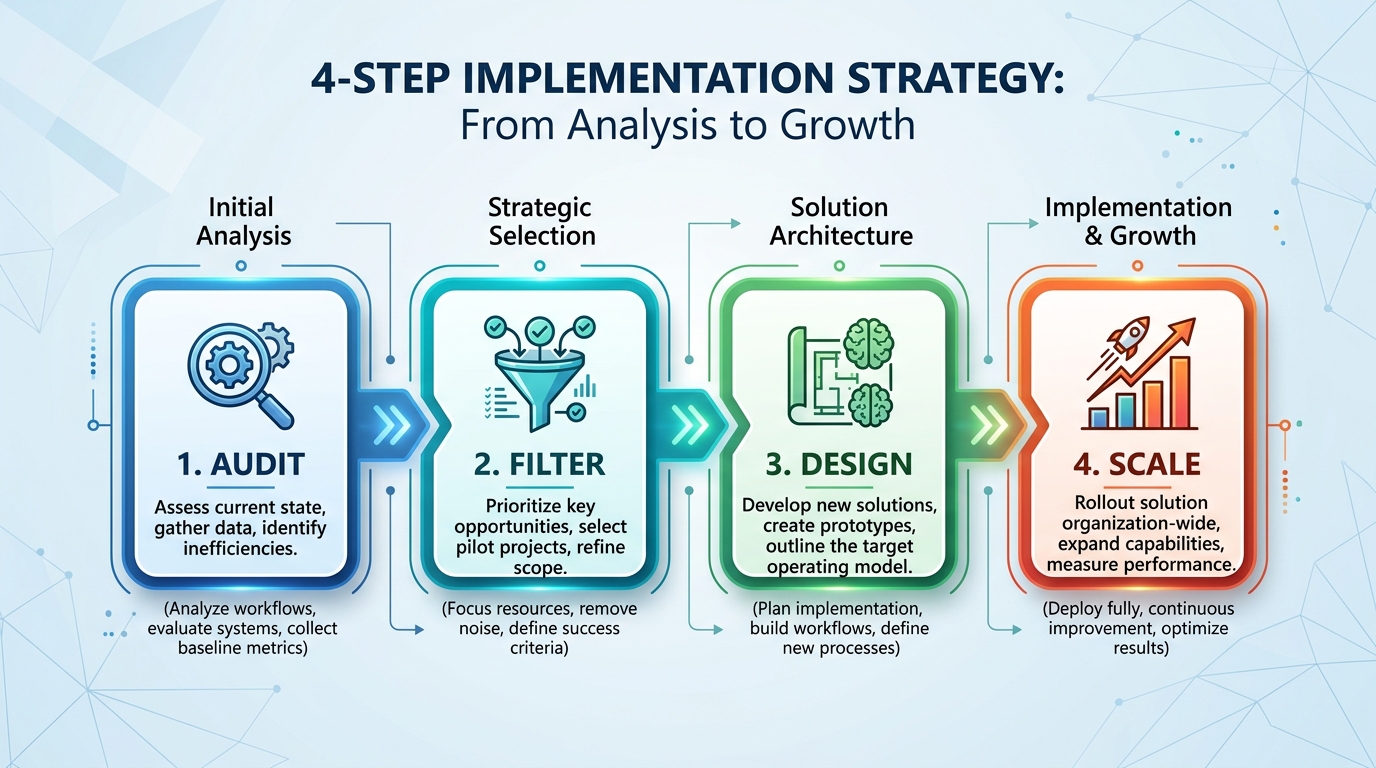
Once you have identified a repetitive workflow that is a great fit for AI, follow this structured approach to implement the solution without overcomplicating things:
- Define and Map the Current State: Document the step-by-step workflow as it is done manually today. Note how long each step takes, where the data comes from, and where it needs to go.
- Establish Clear Guardrails: Decide where a human needs to be involved. In the beginning, we recommend a "human-in-the-loop" model, where the AI drafts the output (like an email response or a database entry) and a team member reviews and approves it with a single click.
- Choose the Right Tools: You do not always need to build a custom tool from scratch. Many modern software platforms have native AI features built-in, or you can build lightweight, custom AI agents using API integrations.
- Measure and Scale: Track the performance of your automated workflow over a trial period of two to four weeks. Measure the time saved, the accuracy of the outputs, and your team's feedback. Once validated, expand the system to other workflows.
Final Thoughts: Start Small, Think Scalable
The path to building a highly efficient, AI-enabled business does not require a massive, disruptive overhaul of your existing operations. It begins with a practical look at the everyday workflows that keep your team bogged down in administration.
By targeting repetitive, structured, high-volume tasks first, you secure quick operational wins that save immediate hours, reduce human error, and build momentum for your digital transformation.
Look at your team's daily calendars this week. Find the friction, isolate the patterns, and let AI do the heavy lifting.
Need Help Identifying AI Opportunities in Your Business?
At Growency AI, we partner with mid-market businesses and operations managers to build practical, high-impact AI systems. Whether you are looking to deploy custom AI agents, automate manual data pipelines, or set up intelligent customer support routing, we build solutions tailored to your operational realities.
Explore Growency AI: https://growency.ai/
Related Reading
Enjoyed this article? Join the Growency newsletter
Practical AI tips for service businesses, straight to your inbox. No spam, unsubscribe anytime.