September 6, 2026
Why Git Is the Best Database for Multi-Agent AI
Learn how the Git-Native Agent Protocol (GNAP) solves state management for agentic swarms. Discover how to orchestrate AI agents using Git as a database.
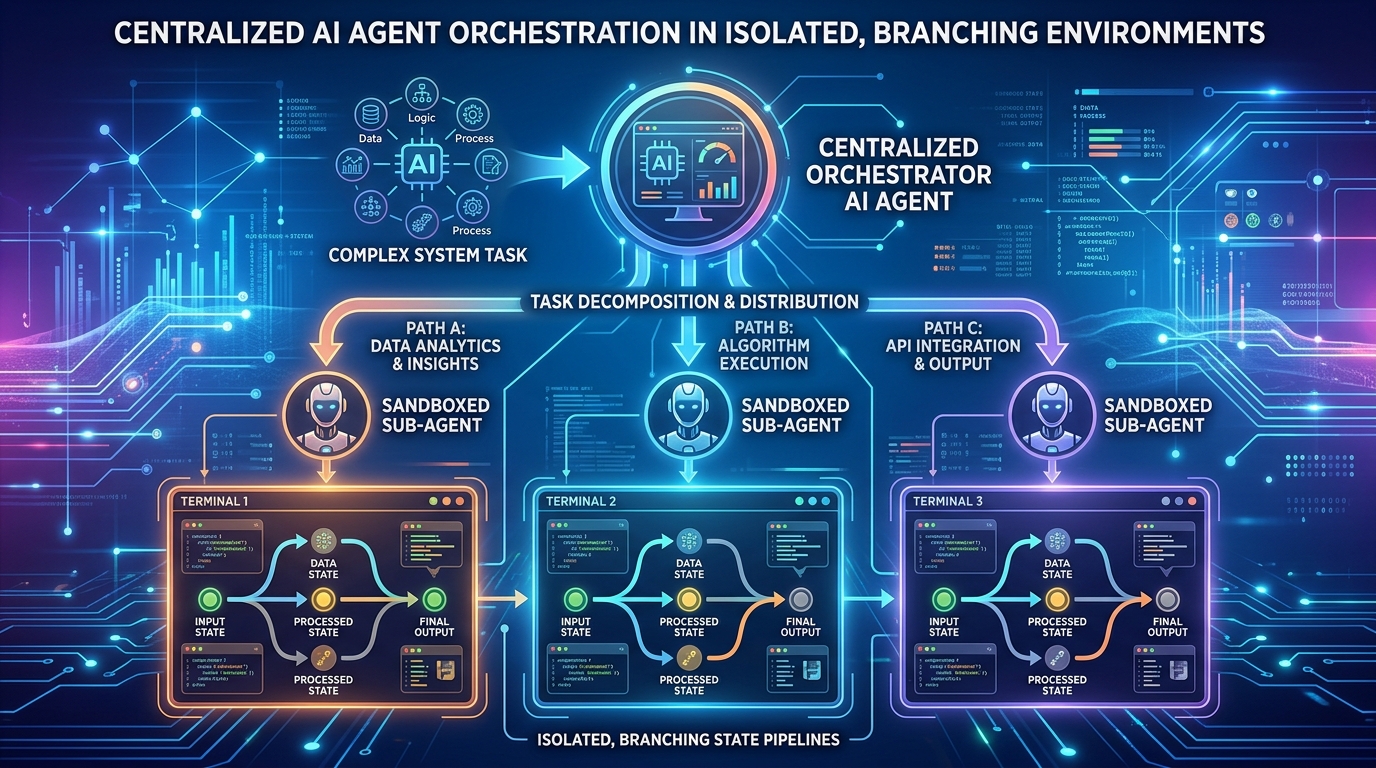
Orchestrating Sub-Agents: Managing Parallel Workflows and State Splitting in Terminal Swarms
The frontier of AI utility has shifted from simple chat interfaces to agentic systems capable of executing complex, multi-step workflows. Yet, single-agent architectures quickly hit a performance ceiling when tasked with large-scale operations like refactoring software repositories, running complex system migrations, or conducting parallel web operations. To scale efficiency, we must transition to terminal agent swarms: networks of specialized sub-agents operating concurrently in command-line environments.
However, running multiple autonomous agents in a shared terminal space introduces a critical failure mode: state corruption. If two sub-agents attempt to install conflicting dependencies, write to the same file, or modify the same system environment variables simultaneously, the entire system collapses into unpredictable chaos.
To build resilient, high-performance swarms, engineers must implement structured orchestration, parallel workflows, and runtime state splitting. This guide explores the architectural blueprints, state management patterns, and execution frameworks required to orchestrate terminal sub-agents safely at scale.
The Anatomy of Terminal Swarms: Why Parallelism Demands State Isolation
A terminal agent swarm consists of a supervisor agent (the orchestrator) and multiple worker agents (sub-agents) designed to interact with a system shell. The orchestrator decomposes a high-level objective into distinct, parallelizable sub-tasks, assigns them to specialized sub-agents, and synthesizes the final outputs.
While parallel execution slashes wall-clock execution time, it introduces severe concurrency challenges. In a traditional operating system environment, parallel processes share resources. For AI agents, which learn and react based on environmental feedback, unisolated parallel execution leads to several systemic failures:
- Resource Contention: Multiple agents attempting to bind to the same network ports, write to the same database files, or access shared package managers (like apt or npm) simultaneously, resulting in lockouts and crashes.
- Context Contamination: An agent reading terminal outputs that were actually generated by a different agent running a parallel task, leading to incorrect assumptions and hallucinated error-correction loops.
- State Drift: The system state changing beneath an agent's feet. If Agent A relies on a specific version of a library, and Agent B upgrades that library in a parallel thread, Agent A's subsequent executions will fail mysteriously.
To resolve these issues, swarms must employ state splitting. State splitting is the architectural practice of isolating the runtime environment, file system, and shell context of each sub-agent during its active execution cycle, followed by a controlled reconciliation process.
Key Insight: True agentic parallelism cannot exist on a single, shared operating system thread. Just as human developers use git branches and localized containers to avoid stepping on each other's toes, autonomous agent swarms require strict workspace isolation and clean state boundaries to preserve operational fidelity.
Architectural Framework for State Splitting and Merge Operations
To safely manage parallel terminal workflows, systems architects use a multi-tiered state-splitting lifecycle. This framework ensures that each sub-agent works in a pristine, predictable environment while still allowing the master orchestrator to compile their collective achievements.
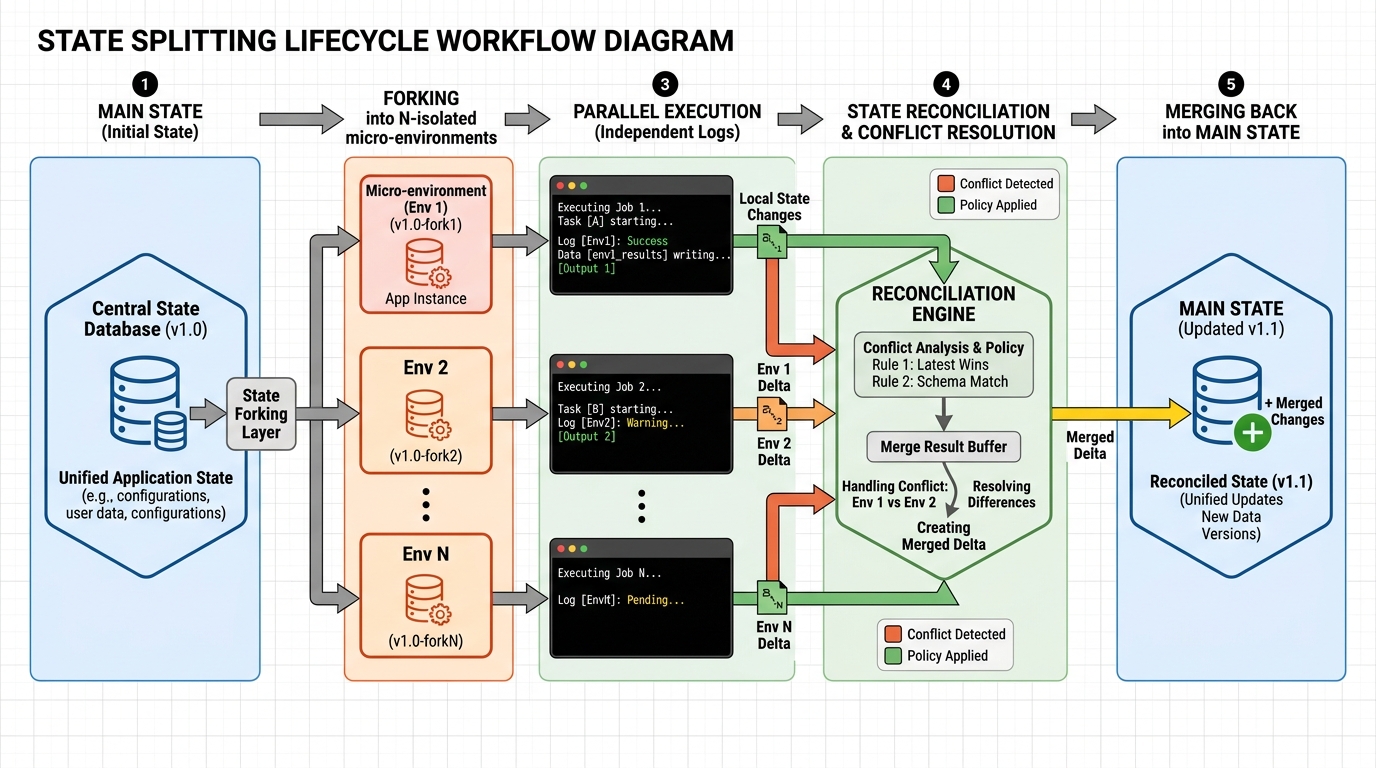
The lifecycle of parallel sub-agent execution operates across four distinct phases:
1. The Fork Phase (State Splitting)
When the orchestrator spawns a sub-agent, it must create a logical or physical branch of the current environment. This can be achieved at varying levels of depth depending on the resource overhead your application can tolerate:
| Isolation Mechanism | State Splitting Depth | Spin-up Latency | Resource Overhead | Best Used For |
|---|---|---|---|---|
| Virtual Environments & Namespaces | Directory and process level isolation | Ultra-low (<100ms) | Low | Light scripting, independent file generation, local tool access |
| Git-Native Branching | File system level isolation in a shared directory | Low (100ms - 500ms) | Moderate | Code refactoring, software development, documentation writing |
| Containerized Sandboxes (Docker/Firecracker) | Complete OS, network, and file system isolation | Moderate to High (1s - 5s) | High | Untrusted code execution, complex system migrations, network-heavy tasks |
2. The Execution Phase (Parallel Workflows)
Once isolated, the sub-agents execute their assigned tasks. During this phase, all terminal stdout, stderr, and file system modifications are strictly confined to the agent's specific sandbox or branch. The orchestrator monitors execution logs asynchronously, looking for completion signals or failure exceptions without intervening in the runtime operations of other agents.
3. The Reconciliation Phase (Conflict Detection)
Before any modifications are merged back into the main system state, the orchestrator must run conflict detection. If Agent A and Agent B both modified the configuration file settings.json, the orchestrator cannot blindly overwrite one with the other. It must analyze the diffs, identify overlapping edits, and programmatically resolve conflicts.
4. The Merge Phase (State Integration)
Once conflicts are resolved, the isolated states are compiled back into the primary environment. For git-native setups, this involves merging branches. For containerized setups, this involves copying validated assets or running structured migration scripts against the host system.
Step-by-Step Implementation Guide for Orchestrating Parallel Sub-Agents
Let us walk through a practical execution framework for orchestrating sub-agents using a Python-based supervisor and a git-native file system approach. This setup allows sub-agents to safely run parallel development tasks without corrupting the main codebase.
Step 1: Initialize the Master Orchestrator
The supervisor agent must first analyze the project directory and define the workspace boundary. It initializes a primary state tracker and prepares to split tasks.
import os
import subprocess
import concurrent.futures

class SwarmOrchestrator:
    def __init__(self, workspace_path):
        self.workspace_path = workspace_path
        self.active_branches = []

    def run_command(self, cmd, cwd=None):
        result = subprocess.run(cmd, shell=True, capture_output=True, text=True, cwd=cwd or self.workspace_path)
        if result.returncode != 0:
            raise Exception(f"Command failed: {cmd}\nError: {result.stderr}")
        return result.stdout
Step 2: Implement State Splitting (Branching)
For each sub-agent, we split the state by creating an isolated Git branch and a unique working subdirectory if necessary. This isolates code edits and prevents parallel file writes from colliding.
    def split_state(self, sub_agent_id):
        branch_name = f"agent-sandbox-{sub_agent_id}"
        print(f"[Orchestrator] Splitting state for sub-agent {sub_agent_id} into branch {branch_name}")

        # Ensure we start from a clean main state
        self.run_command("git checkout main")
        self.run_command("git pull origin main") # If remote is configured

        # Create and checkout a new isolated branch
        self.run_command(f"git checkout -b {branch_name}")
        self.active_branches.append(branch_name)
        return branch_name
Step 3: Parallel Sub-Agent Execution
We deploy the sub-agents concurrently using a thread pool. Each sub-agent is assigned its own isolated branch, where it can execute terminal commands, run linters, and commit files independently.
    def execute_sub_agent_task(self, sub_agent_id, task_description, tool_call_fn):
        # Step 2: Split the state
        branch_name = self.split_state(sub_agent_id)

        try:
            # Step 3: Execute isolated task via sub-agent tools
            print(f"[Sub-Agent {sub_agent_id}] Starting task: {task_description}")
            result = tool_call_fn(workspace=self.workspace_path, branch=branch_name)

            # Commit the sub-agent's changes inside its branch
            self.run_command("git add .")
            self.run_command(f'git commit -m "Sub-agent {sub_agent_id} completed: {task_description}"')
            print(f"[Sub-Agent {sub_agent_id}] Completed task and committed changes on branch {branch_name}")
            return {"status": "success", "branch": branch_name, "output": result}

        except Exception as e:
            print(f"[Sub-Agent {sub_agent_id}] Failed: {str(e)}")
            return {"status": "failed", "branch": branch_name, "error": str(e)}
Step 4: State Reconciliation and Merge
After the parallel execution finishes, the orchestrator switches back to the main branch and merges the sub-agent branches one by one. If a merge conflict occurs, the orchestrator uses a specialized LLM conflict resolver tool to intelligently reconcile the overlapping diffs.
    def reconcile_and_merge(self):
        print("[Orchestrator] Starting State Reconciliation Phase")
        self.run_command("git checkout main")

        for branch in self.active_branches:
            try:
                print(f"[Orchestrator] Merging state from {branch}...")
                self.run_command(f"git merge {branch}  - no-edit")
                # Clean up the local branch after a successful merge
                self.run_command(f"git branch -d {branch}")
            except Exception as merge_error:
                print(f"[Conflict Detected] Merging {branch} caused a collision. Invoking Conflict Resolver...")
                self.resolve_merge_conflict(branch)

    def resolve_merge_conflict(self, offending_branch):
        # Retrieve git status to find unmerged files
        status_output = self.run_command("git status  - porcelain")
        conflicted_files = [line.split()[-1] for line in status_output.splitlines() if line.startswith("UU")]

        for file in conflicted_files:
            print(f"[Resolving] Managing file conflict in: {file}")
            # Real-world implementations would feed the file diff with git conflict markers
            # into an LLM context to intelligently decide the merge logic.
            # For this guide, we will execute a standard checkout accept-ours or write-custom script.
            self.run_command(f"git checkout  - theirs {file}")
            self.run_command(f"git add {file}")

        self.run_command('git commit -m "Resolved merge conflicts programmatically"')
        self.run_command(f"git branch -d {offending_branch}")
Mitigating Deadlocks and State Drift in Terminal Environments
Even with robust state-splitting architectures, runtime execution in parallel terminal swarms can experience synchronization anomalies. Here are the three primary failure profiles and the engineering strategies to mitigate them:
1. State Drift During Long-Running Tasks
If Sub-Agent A is executing a task that takes 10 minutes, and Sub-Agent B completes its task and merges its changes back into the main branch within 1 minute, Sub-Agent A is now operating on stale ancestral state.
- Mitigation Strategy: Implement periodic rebasing. The orchestrator can asynchronously pause long-running sub-agents, pull the newly merged main state into their isolated branch (e.g., via
git rebase main), and resume execution once any immediate rebasing conflicts are automatically resolved.
2. Lockfile and Package Metadata Collisions
When multiple sub-agents install different dependencies in parallel, their individual package manifests (such as package-lock.json or poetry.lock) will diverge heavily, leading to messy merge conflicts that are difficult for LLMs to resolve programmatically.
- Mitigation Strategy: Centralize dependency management. Sub-agents should not have permission to install packages directly to the shared lockfile during parallel execution. Instead, they must submit a dependency request to the master orchestrator. The orchestrator queues these requests and runs package installations sequentially on the main state before distributing updated base images or branches to the sub-agents.
3. Cascading Failures and Deadlocks
If Sub-Agent B's task depends on a file being compiled or exposed by Sub-Agent A, but both are launched concurrently, Sub-Agent B will immediately crash or enter a loop waiting for an asset that does not yet exist.
- Mitigation Strategy: Build a Directed Acyclic Graph (DAG) of task dependencies. Before initiating execution, the orchestrator must map out which tasks rely on the outputs of others. Tasks with shared dependencies must be scheduled sequentially, while only truly orthogonal tasks are cleared for parallel execution.
[Task DAG Example]
          [Task 1: Generate Database Schema]
                         |
         + -  -  -  -  -  -  - -+ -  -  -  -  -  -  - -+
         |                               |
[Task 2: Build API Views]     [Task 3: Build Admin Dashboard]
         |                               |
         + -  -  -  -  -  -  - -+ -  -  -  -  -  -  - -+
                         |
           [Task 4: Run Integration Tests]
In the diagram above, Task 2 and Task 3 are completely orthogonal and can run in parallel sandboxes. However, neither can execute until Task 1 completes and merges its database schema back into the main state.
Building Resilient Swarms for Production
Orchestrating sub-agents through parallel workflows and state splitting transitions agentic AI from an interesting prototype to a reliable enterprise-grade engine. By enforcing strict environment isolation, defining clean reconciliation lifecycles, and managing task dependencies through structured DAGs, companies can deploy agentic terminal swarms that complete complex operations securely and efficiently.
As you design your multi-agent architecture, remember that the reliability of your swarm is directly determined by the isolation of its components. Protect your runtime state, sandbox your execution contexts, and treat state reconciliation with the same rigor you would apply to human-written production pipelines.
Related Reading
To dive deeper into multi-agent design patterns, state-management infrastructure, and scaling tool gates, explore our in-depth technical guides:
Enjoyed this article? Join the Growency newsletter
Practical AI tips for service businesses, straight to your inbox. No spam, unsubscribe anytime.